Your hypercare report shows a ticket count by severity and an average time to resolve.
Neither number will change what you test in the next release.
Why? They measure how loud the release was, not which of your decisions let each incident through.
If your lessons-learned deck lists the same three problems as last time, this is why. And if nobody can say which test would have caught which ticket, you’ll build the next scope on the same assumptions as this one.
If you’re a release manager or head of QA on an SAP, Oracle or Workday system, you own that next scope. Often you also have to win it from a programme board.
The time to change it is the few weeks between hypercare closing and the next scope being signed. Those weeks are the one time the tickets, the scope list and the people who made each decision are all still to hand.
In this article, I’ll show you how to use those weeks. Specifically, you’ll:
- Sort every post-go-live ticket by the release decision that let it through.
- Read the counts honestly.
- Walk into the meeting with a short list of changes to the next scope, each with an owner.
Done this way, every count judges a decision. Not a tester.
The short answer: what to measure after go-live
Measure the decisions, not the noise.
In practice, that comes down to five moves. The rest of this article takes them one at a time:
- Sort every post-go-live ticket into one of six classes, with six questions asked in a fixed order and answered from records you already hold.
- Count escapes by class. An escape is a defect that reached production. Five of the six classes are escapes, and the sixth is “not a defect”.
- Check each scope exclusion against what it produced in production.
- Read every count with its 95% range, the span the true figure very likely sits in. Under 20, give the count, not a percentage.
- Decide one next-release change per class, with an owner and the release it lands in.
When should you measure? Over your hypercare window. That’s the two weeks after a quarterly patch, or up to the first month-end close or payroll run after a large go-live.
And you don’t need a traceability tool. A ticket export, the records your release already keeps and a spreadsheet are enough.
Why ticket counts and resolution times leave the next release unchanged
Start with what your hypercare report measures. If it shows tickets by severity, time to resolve and perhaps one leakage percentage, here’s the problem: each of those describes the release’s noise, and none of them names a cause.
Take severity. It tells you which ticket hurt most, but it doesn’t tell you why that ticket got through. Did the impact analysis miss the object? Did the scope leave it out? Or did the test run and miss the condition? Those are three different failures, with three different fixes.
Time to resolve is a fair measure of the support team. But it’s silent on scope.
What about a single leakage percentage? It fails in its own way, because it blends every cause into one figure. So a release that missed four interface mappings can show the same number as one that loaded the wrong test data.
Even that one figure can take manual work to build. For example, in a Ministry of Testing thread on tracking QA metrics, one member described their tooling in 2025: “Spreadsheets, still very manual, particularly to track leakage or effort vs. bugs per module.”
Then leadership asks for “defect leakage”, and the team fears it will be read as a tester scorecard. That fear is reasonable. DORA’s guide to software delivery metrics warns that setting a metric as a goal “increases the likelihood that teams will try to game the metrics”. It also warns that “isolating teams with specific metrics can lead to friction and finger-pointing”.
The sorting below keeps the number and takes the scorecard out of it.
What DORA’s change fail rate can and cannot tell an ERP release team
DORA’s delivery measures are the standard answer to that request. The catch? They count deployments, not decisions.
DORA defines change fail rate as “the ratio of deployments that require immediate intervention following a deployment”, likely a rollback or a hotfix. Its deployment rework rate is “the ratio of deployments that are unplanned but happen as a result of an incident in production”. Both are built around deployments. They count how often a deployment fails or forces another one.
Now think about a quarterly ERP release. It’s one deployment carrying many changes. Count it with DORA’s measures and you learn that the release needed intervention. You don’t learn which decision let the problem through, and that’s the question the next scope depends on.
Sort every post-go-live ticket by the decision that let it through
For each ticket, ask which release decision let it through. Then answer from a record, not from memory. Six questions do the work.
Six questions, asked in a fixed order
Work down the questions for every ticket. Stop at the first yes. Each question names the record that answers it.
This table and the eight-measure table further down are the whole classification sheet. Copy both into the spreadsheet beside your export.
| Order | Question | The record that answers it | If yes, the class |
|---|---|---|---|
| 1 | Did the system behave as designed? (training, authorisation, master data the business owns, a request for change) | the ticket’s resolution code and the design document | F — not a defect |
| 2 | Was the failing object or setting different in production from the build you tested? (a transport missing or out of order, a data load, a change made directly in production, a vendor patch applied after testing) | the transport or cutover log (for a vendor update, your production environment’s update history), compared with the tested build | E — introduced at cutover, migration or transport |
| 3 | Was the changed object, or the process it touches, missing from the impact analysis? | the impact-analysis list (for a vendor update, the release notes and fixes list as you mapped them) | A — not identified in impact analysis |
| 4 | Was it identified, then left out of test scope? | the scope list or exclusion log, with its reason | B — identified but excluded from scope |
| 5 | Was it in scope, and did the test pass without exercising the failing condition (a variant, a data combination, a path)? | the test case and its result | C — in scope, condition not exercised by the test |
| 6 | Did a test exercise the same condition and pass, with the failure reproducing only on production data or configuration? | the test result plus the reproduction | D — tested, but data or environment differed |
A quick note on the letters: they’re labels, not ranks. A to E are the escapes, in the order a release makes those decisions. F is not a defect.
The order of the questions matters too, for two reasons. First, the cutover question comes before the impact-analysis question, because a missing transport makes a well-scoped object fail for a reason no test could see. Second, the scope question comes before the test-design question, because a test nobody asked for cannot have missed anything.
The impact-analysis list is your record of what the ISTQB glossary’s definition of impact analysis calls “the identification of all work products affected by a change”. Finishing that list on time is hard, as why impact analysis is the real bottleneck in HCM releases explains.
Why each answer must come from a record, not a view
Each class has to be read from a record, never decided by opinion.
In a 2018 Ministry of Testing thread on metrics, one member planned “to find a way to determine if we should have captured those defects in our testing”. It’s the right question, asked the wrong way. Here’s why: “should have” is a view, and views change with who is in the room.
Orthogonal Defect Classification, developed by Ram Chillarege at IBM, sets one rule for classifying software defects. In that scheme, a defect’s trigger captures “the circumstance that allowed the defect to surface”. The class rests on known facts, such as the defect’s type or trigger, “and not on opinion such as where it should have been found”.
The same rule applies to post-go-live tickets, and it is what turns six questions into six lookups.
The result: two people holding the same records should reach the same class. If they don’t, a record is missing. And that’s your first finding.
Why this judges decisions, not testers
The strongest objection to counting escaped defects? That the count becomes a tester scorecard. ISTQB’s own definition of an escape answers that objection.
The ISTQB glossary defines an escaped defect as “a defect that is not detected by a test activity that is supposed to find it”. Read strictly, that wording fits only two of the five escape classes: C, where the test ran and missed the condition, and D, where it passed on different data.
What about the other three? A defect in an area nobody asked anyone to test, class A or B, escaped the decision about what to test. And a defect introduced at cutover, class E, entered after the tests had run.
So the sheet names a decision and the record behind it. It never names a person. Report the counts that way, and leadership gets its requested number without a scorecard attached.
When the record you need does not exist
Hypercare data is messy. Some questions will have no record to answer them.
Say a defect hits production in an area the team chose not to regression-test, and the reason for that exclusion is in nobody’s notes. Don’t guess. Record it as “B, reason unrecorded”. Then start an exclusion log for the next release: the area, the reason, the person who agreed it and the date. The missing record is the finding.
One more tip: if a systems-integrator partner holds your hypercare tickets, ask for the export with resolution codes. You need their codes. Not their analysis.
When the vendor ships the change: Oracle and Workday updates
On a vendor-delivered update, you never see the changed code. Which means two of the six questions take their answer from a different record.
First, Oracle. Oracle releases new features and major enhancements for Fusion Cloud Applications four times a year, in a quarterly update that is mandatory for all customers. Monthly patching, where it’s switched on, carries bug fixes only. New features arrive only in the quarterly update.
Next, Workday. Workday delivers fixes in weekly service updates. New functionality arrives in feature releases twice a year, which “may require uptake”, and reaches preview tenants about five weeks ahead.
On-premises and private-cloud SAP works differently. There, your own team moves changes between its systems through SAP’s Change and Transport System.
So on a vendor update, here’s what changes:
- Class A on a vendor update. The record is the release notes and fixes list as your team mapped them to your configuration. An item the notes listed but your mapping skipped is an impact-analysis miss, even though you never saw the code.
- Class E on a vendor update. The record is your environment’s update history: when each vendor patch or weekly update reached production. One that arrived after testing finished is class E. On SAP, the transport log answers the same question.
The other four questions work the same way on every platform.
Eight measures, and the next-release change each one drives
Once every ticket has a class, eight measures follow. One per class, and two for the whole release. Each one is tied to one change in the next release.
| Measure | How to count it | What it changes in the next release |
|---|---|---|
| Escapes by class | the count of A, B, C, D and E | the class with the highest count gets the next release’s first change |
| Impact-analysis misses (A) | the count of A, with the kind of object missed: a custom report on a changed table, an interface mapping, an output form, a batch variant | add each missed kind to the impact-analysis checklist |
| Exclusion yield (B) | excluded areas that produced an incident, out of all areas excluded; the quiet ones are read with the rule for quiet areas below | whether each exclusion rule survives |
| Test-design misses (C) | the count of C, with the condition missed | add the condition to the regression pack |
| Parity misses (D) | the count of D, with the data or setting that differed | refresh test data or fix environment parity |
| Build misses (E) | the count of E | transport-sequence and build-compare checks before cutover |
| Release detection percentage | defects found by testing, divided by defects found by testing plus escapes A to E | if it falls across three releases, the next release reviews its whole test approach; never a team target |
| Not-a-defect load (F) | the count of F by type: training, authorisation, data ownership | job aids, role tests and data-ownership notes: outside test scope, still a next-release action |
One rule for every report: put the counts first. The reading rules further down say when a percentage is safe to show.
Release detection percentage: a trend, never a target
One release-wide figure is still worth keeping, as long as you read it as a trend.
ISTQB defines defect detection percentage as “the number of defects found by a test level, divided by the number found by that test level and any other means afterwards”. Here I apply it to the release as a whole, with all testing before go-live treated as one level. It’s the most honest version of the “defect leakage” figure leadership asks for.
Track it across releases. But never set it as a target for a team. Why? The DORA warnings above apply in full. A target invites gaming, and a number pinned on one team invites finger-pointing.
A worked example: one quarterly SAP release
The release below is an example, built to show the sheet filled in from the first ticket through to a decision list. Only your own export will tell you how cleanly your tickets sort.
Release R3 is a quarterly SAP S/4HANA change release with three weeks of hypercare, the third in a series running R1 to R3.
It produced 41 tickets. Twenty-six were not defects: 11 training, 9 authorisation and 6 business-owned master data. The other 15 were escapes. Testing before go-live found 85 defects, so the release detection percentage is 85 out of 100 (85 found plus 15 escaped), or 85%.
Here’s how those tickets sorted:
| Class (R3) | Count | 95% range | What it pointed at |
|---|---|---|---|
| A — not identified in impact analysis | 4 | 1.1–10.2 | a custom report on a changed table, the bank-file interface mapping, a delivery-note output form, a batch job variant |
| B — identified but excluded from scope | 3 | 0.6–8.8 | intercompany billing (2 tickets), excluded as “no pricing change” although the update changed the billing document type; asset retirement (1), excluded as “low use” |
| C — in scope, condition not exercised by the test | 4 | 1.1–10.2 | multi-currency invoices, partial goods receipts, credit memos with reference, approvals over threshold |
| D — tested, but data or environment differed | 2 | 0.2–7.2 | a bank master variant missing from test data; output device configuration |
| E — introduced at cutover, migration or transport | 2 | 0.2–7.2 | a transport imported out of sequence; an output setting changed directly in production |
| F — not a defect | 26 | 17.0–38.1 | training (11), authorisation (9), master data (6) |
| Escapes, A to E | 15 | 8.4–24.7 |
Now read the class column, not the total. Four escapes came from objects nobody put on the impact-analysis list. Two came from one exclusion whose reason was wrong. And of the 46 areas excluded from scope, 2 produced incidents and 44 stayed quiet. That’s an exclusion yield of 2 in 46.
Compare that with the severity view. Sorted by severity, the same 15 escapes are one severity 1, three severity 2, ten severity 3 and one severity 4. That view gives no hint of where to act.
Fifteen escapes may also look worse than the 9 in the release before, R2. On these numbers, the rise is not evidence of a worse release.
Reading small numbers: why nine incidents should not become percentages
When a release produces tens of incidents rather than thousands, percentages mislead. With several hundred incidents, rates start to work.
Five rules keep the reading honest.
Is four releases a year too few to measure? No. It’s too few for rates, but enough for counts.
Under 20, give the count, not a percentage
Report the count itself whenever a class or a release holds fewer than 20.
Here’s why: the uncertainty of a count is roughly one divided by its square root. That’s about 33% at 9 incidents and 22% at 20. A share of a small count is safe only beside the count and its range.
For example, four of the example release’s 15 escapes were class A. As a share, that’s 27%. But anything from 11% to 52% fits, which is why the count comes first. That range comes from the Wilson score method, the method UK public-health technical guidance on counts uses for a proportion.
Compare releases by their ranges, not by the raw difference
Before calling one release worse than another, check whether their ranges overlap.
The example release had 15 escapes, with a 95% range of 8.4 to 24.7. The release before it had 9, with a range of 4.1 to 17.1. The ranges overlap, so the honest reading is “no clear change”.
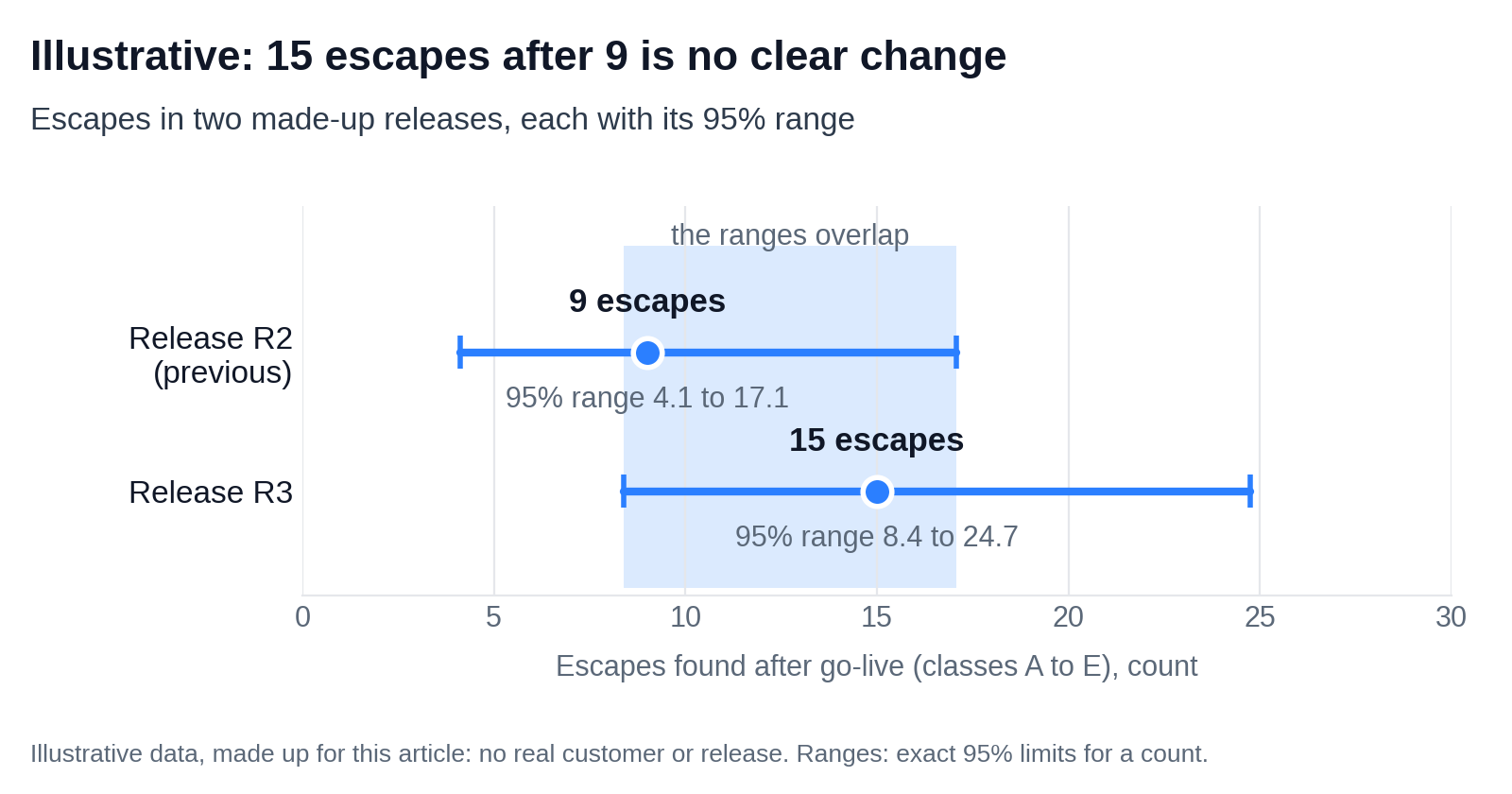
Both ranges here are exact limits. For a count under 10, the same UK guidance calculates its limits with that exact method.
One caveat: the exact method assumes incidents arrive independently. Say so once in the report.
Pool a class over three releases before calling it a trend
Call nothing a trend until a class has been pooled over three or more releases.
For example, in the example history, class A ran 3, 3 and 4 across releases R1 to R3. Pooled, those counts make 10, with a 95% range of 4.8 to 18.4. Even the bottom of that range means more than one class A escape a release.
A class that turns up in every release points to a structural gap, not a bad quarter. For class A, that gap is a kind of object missing from the impact-analysis checklist.
A quiet excluded area is not proof the exclusion was safe
Don’t read silence from an excluded area as proof the exclusion was safe.
A 1995 BMJ statistical reminder set out a shortcut for events that have not yet happened. After n cases with no event, the top of the event’s 95% range is about 3 divided by n, for n above 30. Statisticians call it the rule of three. The paper applied it to surgical complications in patients, not to software.
In the example release, 44 excluded areas stayed quiet. For those 44 areas, the chance of an incident in each could still be as high as about 7% (exact 6.6%, rule of three 6.8%).
Two notes on the rule. First, it assumes the areas are independent and equally risky. Real release areas are neither, so read the bound as an order of magnitude, not a risk score. Second, below the paper’s 30-case condition, the shortcut overstates the risk a little, so it stays cautious: at 20 cases it gives 15% against an exact 13.9%.
One severity-1 escape is enough to act on
Act on any single severity-1 escape, whatever the counts say. Statistics decide where to look for patterns. They never decide whether one serious escape gets its own cause analysis.
In the example release, the one severity 1 was the bank-file interface mapping missing from the impact-analysis list. It earns a cause analysis of its own, beyond its place in class A’s count.
Take a decision list, not a dashboard, into the lessons-learned meeting
Bring one line per class with a count above zero: the change, its owner and the release it lands in.
Why a list? A programme board can approve a list like this in one sitting, because each line is a decision, not an observation.
Here’s what that list looks like for the example release:
| Class (R3) | Change for the next release | Owner | Lands in |
|---|---|---|---|
| A (4 in R3; 10 over R1–R3) | add the 4 missed object kinds to the impact-analysis checklist; treat class A as structural | impact-analysis lead | R4 |
| B (3) | put intercompany billing back in scope; keep asset retirement excluded, with its reason logged | release manager | R4 |
| C (4) | add the 4 missed conditions to the regression pack | test lead | R4 |
| D (2) | refresh bank master test data; align output devices with production | test data and environment owner | R4 |
| E (2) | add a transport-sequence check; stop direct production changes during cutover | cutover lead | R4 |
| F (26) | write a job aid for the new approval step; add a role test for the 9 authorisation tickets; write a data-ownership note | training, security and data owners | R4 |
The owners above are roles. Yours will be names.
A word on finance close and payroll. If an exclusion touched either, record it in the exclusion log with its reason. A missed test there can also be a control finding.
Your hypercare report told you how loud the release was. The sorted export tells you which decisions to change, and how far to trust each count.
So start this week, before the next scope is signed:
- Export the last release’s hypercare tickets with their resolution codes.
- Put the scope list beside them.
- Sort the first 20 tickets with the six questions.
Where a question has no record to answer it, write that down first. That way, the next release starts from what production showed. Not from the assumptions that let this release’s incidents through.
In my article on the HCM release operating model, one shift is from one-time sign-off to evidence-backed learning. This sorting is the working detail behind it. It pairs with keeping release knowledge in the organisation, not in one person’s head.
And if you want a second pair of eyes on your first sort, talk to the TurboCore team.