The release window has shrunk again. The full regression pack won’t fit.
So you choose what to leave out, and in the test report you write the familiar line: not executed due to time constraints.
That line won’t survive the one question an IT auditor asks when they pick your change: why wasn’t this tested? It names the pressure you were under, and says nothing about the risk you took.
There’s a better way to leave a test out. Give it its own line in the exclusion record, and write that line before execution starts. Each line says three things:
- what the test protects
- how strong your evidence is that the change can’t reach what it protects
- who accepted the risk that’s left
Six kinds of test are never left out, whatever the window. By the end of this guide, you’ll be able to write that line for every test you drop, and you’ll know which lines to refuse before you sign.
Why write it before execution? Because when an auditor samples one change from your year, every test you left out becomes a question, and you can only answer it from what you wrote down at the time. A note written after they ask records your memory, not your decision.
If you sign a reduced regression scope for an SAP, Oracle or Workday release, this guide is for you. Maybe your external auditor tests SOX IT general controls: how systems are changed, accessed and run. Maybe internal audit reviews your changes, or a GxP regulator does. Either way, the scope you sign this quarter may cover the very change a later audit picks.
What the auditor checks when they pick your change
Every field in the record answers a question the auditor brings to your change. So start with their side.
Under SOX, your external auditor works to the standards of the PCAOB, the US body that sets auditing standards for audits of listed companies. Internal audit and GxP regulators have their own rules. I use the PCAOB text because it’s public and specific about change.
The first thing to know: the auditor doesn’t test every control. Their standard for audits of internal control, AS 2201, says they should test “those controls that are important to the auditor’s conclusion”. Those are the controls their opinion rests on, and your left-out tests must not put them at risk.
Auditors skip work too. To do it, they need the same thing you need: evidence that nothing relevant changed.
Take an automated control, a check the system runs by itself. One example is blocking an invoice that doesn’t match its purchase order and goods receipt. AS 2201 lets an auditor carry last year’s test of such a control forward without repeating it, on two conditions. Controls over program changes, access and computer operations must stay effective and keep being tested. And “the auditor verifies that the automated application control has not changed since the auditor established a baseline”: that is, since their last test of it.
So even the auditor’s shortcut runs on evidence that nothing changed.
Changed reaches further than code. The standard says these controls may depend on “the related files, tables, data, and parameters”. Its example is an interest calculation that might depend on a rate table. A change to configuration or to a table can alter a control as surely as new code.
The PCAOB’s risk-assessment standard, AS 2110, also looks beyond code. It says the auditor should understand the risks that come from IT, and its examples include:
- unauthorised changes to programs and to master data
- failure to make necessary changes
- IT staff holding access beyond what their duties need, which undermines segregation of duties (keeping incompatible tasks with different people)
So what counts as evidence that nothing changed? Asking around isn’t enough on its own.
PCAOB staff describe a case in Staff Audit Practice Alert No. 11 (2013; by its own statement, it doesn’t set the PCAOB’s rules). An audit team had tested some higher-risk controls partway through the year. To carry those results to year end, it relied only on general questions about whether the controls had changed. The staff treat that as a shortfall.
If that isn’t enough for an auditor on a higher-risk control, I don’t accept it from a test team either.
The auditor also checks the reports a control relies on. Their audit-evidence standard, AS 1105, covers information the company itself produced. When the auditor uses such information, they should “test the accuracy and completeness of the information, or test the controls over the accuracy and completeness of that information”. Either the report gets checked, or the controls that keep it right do.
The 2013 staff alert adds a point about controls that use data or reports the system produced. To conclude that such a control works, the staff say, means “testing both the selected control and the controls over the system-generated data and reports”.
So a control is only as reliable as the reports it uses. That’s true even of a report that never posts a transaction.
The exclusion record: one line for every test you leave out
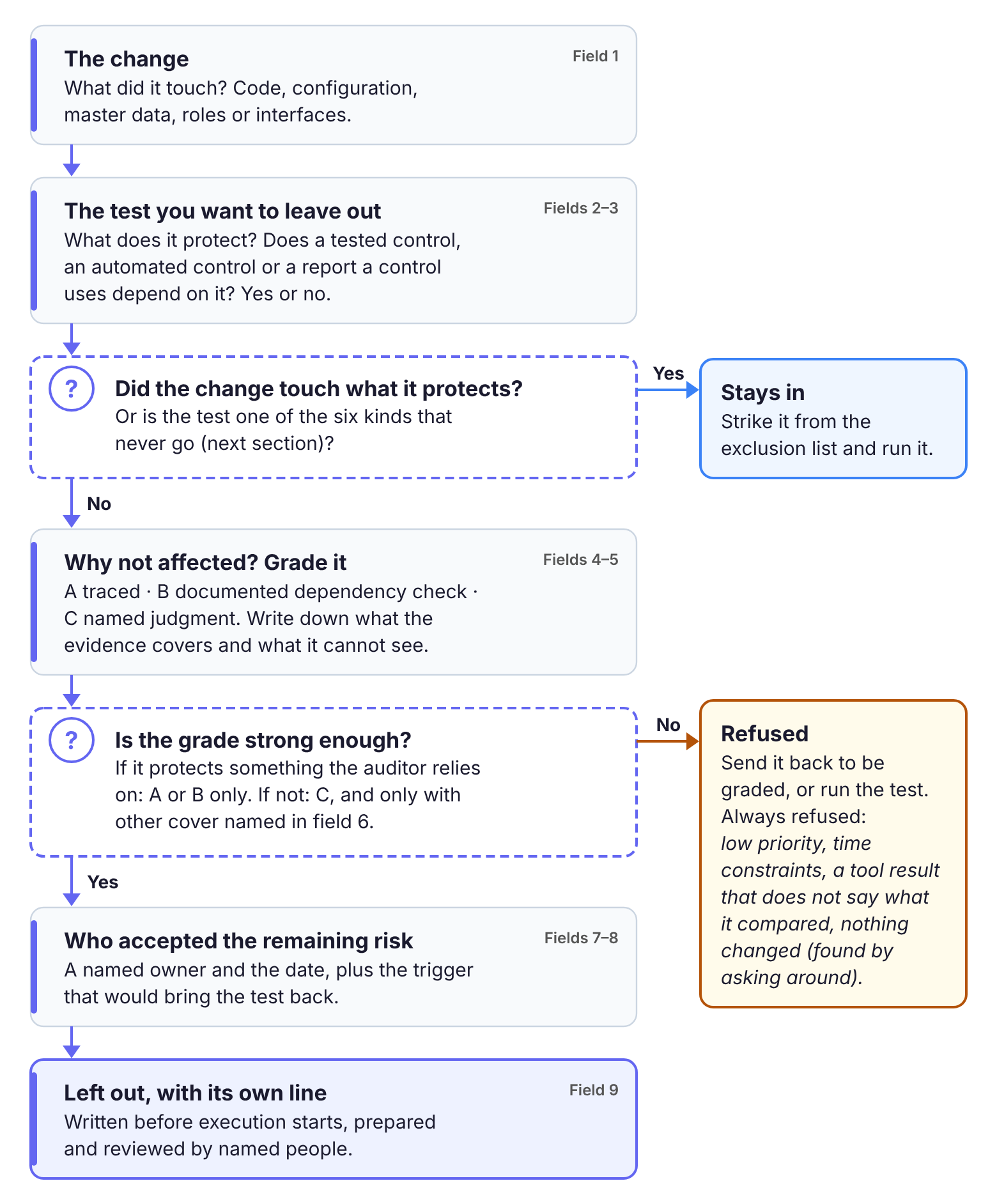
Here’s the record itself. Fill it in before execution starts. One line covers one test, or one group of tests that share a reason.
The nine fields, and the question each one answers
Read the table row by row. The last column is the question that field answers.
| # | Field | What to write | The auditor’s question it answers |
|---|---|---|---|
| 1 | Change | The change, transport or vendor release, and what it touched: code, configuration, master data, roles, interfaces | Which change is this, and what did it touch? |
| 2 | Test or group left out | Test IDs, or the group’s name and count | What exactly wasn’t run? |
| 3 | What it protects | The business process the test protects. Then yes or no: does anything the auditor relies on depend on that process? That means a control the auditor tests, an automated control, or a report that a control uses. If yes, name it. | Does anything I rely on depend on this? |
| 4 | Why not affected, and the grade | The evidence, graded A, B or C (next section) | Why do you believe this change couldn’t break it? |
| 5 | What the evidence covers | The method and its reach: the list or trace used, when it was recorded, what it was compared against, and what it can’t see | Is your not affected complete? |
| 6 | Other cover | A sample run from the group, earlier evidence reused (with its date and build), a vendor test record, monitoring after go-live | What else stands between this risk and an error? |
| 7 | Remaining risk, accepted by | The risk in one line, the named owner who accepted it, and the date | Who decided this was acceptable, and when? |
| 8 | Bring-back trigger | What puts the test back: a later change to the tables, parameters, report logic, roles or interfaces behind what it protects, an emergency fix in the area, or an incident in the area | How would you know if this stopped being true? |
| 9 | Prepared and reviewed | Who wrote the line, who reviewed it, and the dates | Who did this work? |
Field 3 decides most lines, so don’t guess at it. Get the list of controls and reports the auditor relies on from your controls team or internal audit. If only internal audit reviews your changes, field 3 names the controls your internal auditors test. If you make medical devices under FDA’s guidance, field 3 also names any high-process-risk feature the test covers. Those tests are never left out (item 5 in the list below).
Fields 7 and 9 may look like extra paperwork. They come from FDA’s guidance on computer software assurance. (The current edition is from February 2026; it replaced the September 2025 one.) It’s the US regulator’s advice to medical device makers, and it explains how they can show that their production and quality-system software works.
The guidance is non-binding, but in general it recommends what an assurance record should hold. Among other things, it lists:
- the risk analysis result
- a description of the testing
- a conclusion
- who did the work, and when
- approval, where appropriate
Fill each line in field order. If the change touched what the test protects, stop. The test goes back into the run, and there’s no line to write.
Keep each line short. FDA itself says the documentation “need not include more evidence than necessary” to match the risk. One honest sentence per field beats a page of boilerplate.
The hardest field to fill honestly is field 4. It gets its own grading rule in the next section.
Copy the empty record
Paste this into your exclusion record, one block per test or group.
Change (ID, and what it touched: code / configuration / master data / roles / interfaces):

Test or group left out (IDs or group name, count):

What it protects (the process; does a tested control, an automated control or a report a control uses depend on it? yes/no, name it):

Why not affected (the evidence) and grade (A / B / C):

What the evidence covers, and what it can't see:

Other cover (sample, reused evidence with date and build, vendor record, monitoring):

Remaining risk, accepted by (name, role, date):

Bring-back trigger:

Prepared by / reviewed by (names, dates):
How strong is your “not affected”? Grade it A, B or C
Field 4 carries a grade, because not affected means different things depending on how you found out.
- Grade A: traced. A person or tool compared the change’s objects, one by one, with what the test exercises. Field 5 records the method and what it can reach.
- Grade B: a documented dependency check. A named person checked the change’s code, configuration, data and roles against what the test covers, and wrote the reasoning down.
- Grade C: named judgment. A named expert gives a stated reason, without an object-level check.
- Refused. Low priority. Time constraints. The tool said unaffected, with no statement of what the tool compares. Nothing changed, established by asking around.
That last refusal follows from the staff case above.
One rule matters more than the rest. A test that protects something the auditor relies on (field 3 says yes) needs grade A or B. Never C. Grade C is acceptable only where field 3 says no and field 6 names other cover.
What a tool’s “unaffected” does and does not tell you
An impact-analysis tool is often the best route to grade A, as long as you write down what it compared.
SAP’s documentation for Solution Manager 7.2 is unusually clear about this, so I’ll use it as the example. SAP’s change analyser (its Business Process Change Analyzer) works from a list of the objects a transaction uses. It uses that list to “determine whether an executable entity is affected by a change”. Here, the executable entity is the transaction or program, and the question is whether any object on its list changed. A transport request’s changed objects are SAP’s own example of such a change.
The list is only as good as the way it was built. SAP ranks the ways of building it “in descending order of precision”, and a static list comes last, behind “dynamic or semi-dynamic generation”.
For static lists, SAP says “dynamic calls or generated objects are not detected”. A list built without running the transaction can miss code that’s only called, or only created, while it runs.
Even a list recorded while the transaction runs has a gap. The recording picks up calls to third-party systems, but SAP notes that “branched GUI processes in secondary or third-party systems are no longer recorded”. Screens a user works through in another system, during the process, don’t make it onto the list.
Then there’s everything that never travels in a transport. In my experience, master data, user-role assignments and interface partner settings usually change outside the transport path, and a comparison against transported objects can’t see them.
It’s tempting to treat a clean tool result as settling the question, and to drop a transaction’s tests the moment the tool reports it unaffected. That’s too strong. A tool’s unaffected means only that nothing in its recorded list changed. It says nothing about objects, data or paths that were never on the list.
So write the tool’s reach into field 5, check its blind spots by hand, and grade the line by the result.
Six kinds of test you never leave out
Some tests aren’t graded at all, because no evidence can make them safe to drop. Strike these from any exclusion record before you grade the rest:
- Tests of the changed thing itself. They exercise what the change touched. Leave them out and the change itself goes unchecked.
- Tests of automated controls that the change touched, in their program, tables, data or parameters. The auditor’s own shortcut ends once such a control has changed. These controls may depend on their tables and parameters, not only on their code.
- Tests of reports, queries and extracts that a tested control uses, when the change touched their source data, logic or parameters. Being read-only, or posting nothing, is no reason to leave such a report out. What matters is whether the change touched its data, logic or parameters.
- Tests of access and segregation of duties, when roles, authorisations or provisioning changed. AS 2110 lists IT staff holding access beyond their duties among its examples of IT risk. Role changes for business users raise the same question: who can do what?
- Tests of high-process-risk features, if you make medical devices under FDA’s guidance. FDA counts a feature as high process risk when its failure “may result in a quality problem that foreseeably compromises safety, meaning a medical device risk”. Put simply, if the feature fails, a device could become unsafe.
- Tests of whatever your impact evidence can’t see. That includes dynamic calls a static list misses and branched processes in other systems. It also includes transactions that were never recorded and changes that never pass through a transport.
A worked example: 640 tests, 130 left out, two lines refused
Now watch the record at work on one release.
The company runs SAP S/4HANA and is audited under SOX. This quarter’s release holds a vendor support package and two custom transports. Transport T1 changes the pricing logic for domestic sales orders. Transport T2 adds a field to the supplier master screen.
The regression pack holds 640 tests. The signed scope handles them like this:
- 410 run
- 60 sampled, from three groups
- 40 reused, from a run on the same build 11 days earlier
- 130 left out
Four of the record’s lines are below. The rest follow the same pattern.
| Line | Left out | Protects (field 3) | Evidence and grade (fields 4–5) | Other cover | Accepted by | Outcome |
|---|---|---|---|---|---|---|
| E1 | Travel-expense entry, 12 tests | No tested control, no report a control uses | A. Object lists were recorded while all 12 transactions ran in the last cycle. No object on them matches T1, T2 or the support package’s changed objects. None of the 12 calls another system (checked by hand). | None needed | Travel process owner, dated | Left out |
| E2 | Supplier-list reports, 9 tests | Yes. One report feeds the quarterly supplier master review control. | The tool shows the reports unaffected. But one report reads the supplier master table, which T2 changed. | — | — | Refused, moved to run (never-leave-out item 3) |
| E3 | Export sales-order variants, 25 tests | No tested control | B. The order-to-cash lead compared the pricing condition types T1 touched (domestic only) with the export variants’ types, and wrote the reasoning down. | 5 of the 25 run as a sample | Order-to-cash process owner, dated | 20 left out, 5 sampled |
| E4 | Workflow approvals, 14 tests | Not stated | Low priority | — | — | Refused, sent back to be graded before sign-off |
The two refusals are the point of the exercise.
E2 had a tool result: nothing on the tool’s list for those reports had changed. Field 3 said yes, though, and T2 had changed a table one of the reports reads. That put the line under never-leave-out item 3, and the tests went back in.
E4 had no evidence at all, only a priority label. The grading rule refuses that, so the line went back to be graded.
The record ends with one summary line for the release:
Release summary: 640 in the pack · 410 run · 60 sampled · 40 reused · 130 left out. Every left-out line carries an evidence grade and a named owner. Two lines refused and corrected before sign-off.
Vendor updates where you cannot see the code
That example is SAP, with transports you can open. Many readers can’t see the code at all, and the record has to work for them too.
Remember the auditor’s shortcut from AS 2201? The standard says it can be especially effective for purchased software “when the possibility of program changes is remote”. Its example is a vendor that allows no access to the source code.
In my view, that condition doesn’t hold for a software-as-a-service ERP, because the vendor changes its own code every update cycle. Oracle’s cloud applications update every quarter. Workday ships two feature releases a year, plus weekly service updates. For updates like these, program change isn’t remote. It’s the whole point.
That changes how you fill the record, not whether you keep one.
For a vendor update, field 5 usually reads vendor release notes and our own dependency check. That’s grade B at best. With B as your ceiling, every test that protects something the auditor relies on needs a documented dependency check. Field 7 carries more weight too, because the owner is accepting a risk you could only check against the notes.
Where the release notes say nothing clear about an area a test protects, treat that area as unseen. Those tests stay in, under never-leave-out item 6.
If you make medical devices under FDA’s guidance, one allowance may apply. It may cover supporting software: the tools around production, not the features production runs on. For that software, FDA says assurance “may be sufficiently established by leveraging vendor evaluation and validation records, software installation, or software configuration”. Further testing, FDA adds, “may be unnecessary”.
The allowance doesn’t reach the features your process runs on. It’s also FDA’s alone, so if a different GxP regulator oversees you, check that regulator’s rules.
Does the business owner’s signature make you safe?
You may have been told that once the business process owner signs the scope, the risk is theirs.
A signature does record who accepted the remaining risk. What it doesn’t supply is the evidence that the test wasn’t needed. FDA’s own list shows why: its recommended record lists approval as one item, beside the risk analysis result and a description of the testing. Approval replaces neither of them.
Picture an auditor reading accepted by: finance process owner next to low priority. They still can’t see why the test was safe to drop.
So ask the owner to accept a stated risk, not to bless a list. Put field 7 in front of them with fields 3 to 5 already filled, and let them sign what they can read.
“Just test everything”: what to say back
Sooner or later, someone in a scoping meeting will say it: just test everything.
Testing everything isn’t the safe default, though. It’s a way of avoiding the decision. Three points help in that meeting.
First, even the auditor doesn’t test everything. AS 2201 says it is “neither necessary to test all controls related to a relevant assertion nor necessary to test redundant controls, unless redundancy is itself a control objective”. That is, an auditor needn’t test every control behind a figure in the accounts, nor a second control that does the same job, unless having two is the point. That sentence is about which controls the auditor tests, not your test cases. Use it as a comparison, never as permission.
Second, where FDA’s guidance applies, it recommends risk-based testing. Under that approach, FDA says, choosing and using testing activities and resources is “consciously based on corresponding types and levels of analyzed risk”. How much you test follows how much risk you found.
Third, practitioners reached the same place for automated delivery pipelines. ISACA is the professional association for IT audit and governance. In 2018, the ISACA Journal published an article on speeding up software delivery with change management. In it, Evan Bass and W. Noel Haskins-Hafer wrote that “it is not practical to run the entire test suite against every change for every test step”. Their context is a CI/CD pipeline, where software is built, tested and released automatically, and their answer is to select tests stage by stage.
Before your next sign-off: three checks
Before execution starts, run three checks on the record:
- Every left-out line has field 3 answered, yes or no, with the control or report named.
- Every line where field 3 says yes carries grade A or B.
- None of the six never-leave-out kinds is in the record.
Then open last release’s record and search it for time constraints. Each line you find is a question you couldn’t answer today. Rewrite one of them in the nine fields. If you can’t fill field 4 honestly, that test belongs back in the next run.
When every left-out test has an honest line, why wasn’t this tested? becomes a question you can answer from your own record.
To see how we approach the same decision at TurboCore, visit our test scope optimisation page.