The answers you’ll find say regularly, or after every release, or give a fixed interval of a few months. But no standard, platform document or study backs a fixed interval.
Here’s what does hold up:
- Refresh the tests each change touches, before every cycle.
- Review the whole pack before each platform update.
- Go sooner when your own last five cycles show drift.
The platform’s release calendar sets the floor. Your own results tell you when to go sooner.
This is for you if you own the regression pack for an SAP landscape, often with Oracle Fusion or Workday beside it.
Maybe you’ve seen the signs. The pack fails, and too often the cause is the script, not the system. A defect reaches production in a process the pack says it covers. And nobody can say when the pack was last reviewed.
Refreshing after every release, by feel, hasn’t fixed any of this. Neither has a new test for every bug, or the clean-up drive that stalls at the first test nobody dares retire.
The cost runs both ways. A pack that still tests last year’s process can pass while a defect reaches production. A pack full of false failures spends your test window on the script, not the system.
The platforms set the rhythm. On SAP S/4HANA on premise and Cloud Private Edition, SAP ships a feature or support pack stack every six months. Oracle ships a quarterly update every customer must take. Workday ships two feature releases a year.
On SAP Public Edition, Oracle and Workday, the vendor sets the date, and the gap before production is a matter of weeks. On SAP on premise, you pick the date. Which makes the review easy to put off.
So you don’t need a better guess at the interval. You need two clocks, five signals from your own results and your process owners, and a rule that says when to go sooner.
Here’s how it works.
Use two clocks: one for each change, one for the whole pack
Refreshing tests for a change and reviewing the pack’s health are two different jobs. So they run on two different clocks.
First, one term. A cycle is one full run of the pack, however often you run one. For example: each monthly transport release on SAP, or each Oracle quarterly update.
Clock 1: every change
Before a cycle runs, update the tests the change touches. On each platform, that means:
- SAP on premise: your transports and notes.
- SAP Public Edition: the patch SAP applies every two weeks.
- Oracle: the monthly bug-fix patches, if you take them (for most customers, they’re optional).
- Workday: the weekly service updates.
Platform updates are changes too, so they get the same refresh. Clock 2 adds the full review.
Clock 1 has one more trigger: an escape. An escape is a defect found in production, in a process the pack says it covers. Even one is enough. Refresh that process’s tests straight away, before the next cycle runs.
Clock 2: the whole pack
Clock 2 is the full health review. It asks a different question: is the pack still fit?
It runs before each platform update. A platform update is one the whole pack must absorb. On SAP on premise and private cloud, that’s a stack or an upgrade you apply. On SAP Public Edition, it’s the February and August releases. On Oracle, it’s the quarterly update. On Workday, the March and September releases.
The weekly, two-weekly and monthly patches don’t count here. They’re clock 1 only.
Why keep the review out of the test window? Because you won’t have time for it. A vendor update lands, the countdown to production starts, and the first days go on working out which scripts it touched. On SAP Public Edition and Oracle, that window is only a few weeks.
Clock 1 keeps the pack in step with each change. Clock 2 checks the pack is still worth running.
How often to review the whole pack on SAP, Oracle and Workday
Clock 2 follows each platform’s own release rhythm. The table shows what arrives on each platform, who sets the date and when to hold the full review:
| Platform | What arrives | Who sets the date | Gap between test and production | Full review |
|---|---|---|---|---|
| SAP S/4HANA on premise and Cloud Private Edition | A base release every two years; a feature or support pack stack every six months | You, on premise; on private cloud, you plan it with SAP | You plan it | Before each stack or upgrade you apply: at most twice a year |
| SAP S/4HANA Cloud Public Edition | Major releases in February and August | SAP, with an email about six weeks ahead | Two to three weeks, depending on your landscape | Twice a year, between the upgrade email and the test-system upgrade |
| Oracle Fusion Cloud Applications | A mandatory quarterly update, four a year | Oracle, in one of three sets of months you choose | About two weeks, under Oracle’s recommended cadence setting | Four times a year, before each quarterly update |
| Workday | Feature releases in March and September | Workday; every customer is on the same version | About five weeks of preview, if not earlier | Twice a year, before each preview window opens |
SAP on premise and private cloud: before each stack you apply
On premise and on SAP S/4HANA Cloud Private Edition, SAP ships feature pack stacks every six months after each base release, until the next one. Then the older release gets support pack stacks instead. Those carry corrections only.
SAP announced this two-year cycle in 2022. It started with the 2023 release, with feature packs then planned every six months.
On premise, SAP leaves every part of the upgrade to you. So you choose when. On private cloud, SAP carries out the technical upgrade. The planning and testing stay with you or your implementation partner.
On private cloud, you need at least one upgrade every seven years to stay in mainstream maintenance. And as a RISE with SAP customer, you can request one upgrade a year.
Stacks come every six months. So your review follows the stacks you actually apply: at most twice a year. Apply fewer, and you hold fewer reviews.
SAP Public Edition: between the upgrade email and the test upgrade
On SAP S/4HANA Cloud Public Edition, SAP emails you about six weeks before each upgrade. It upgrades your test system first. Production follows two to three weeks later, depending on your landscape. Use the dates in your email.
So hold the review in the weeks between that email and the test-system upgrade.
Oracle Fusion: four times a year, before each quarterly update
On Oracle Fusion Cloud Applications, Oracle makes the quarterly update mandatory for all customers.
Note: if your environment family includes Fusion Cloud Payroll, the whole family’s months are fixed. They’re February, May, August and November.
Is four reviews a year too many? No. The update isn’t optional. The window is short, too.
Here’s why it’s short. Oracle recommends putting only production on its production cadence, and test and development on the non-production cadence. Outside the Middle East, non-production environments then update on the weekend after the first Friday of the month. Production follows on the weekend after the third Friday.
That’s about two weeks. A full review won’t fit inside it. So hold it before the update reaches your test environment.
Workday: twice a year, before each preview window
Every Workday customer is on the same version. New features reach preview tenants about five weeks before each feature release, if not earlier. So finish the review before each preview window opens.
Put one review after your financial year-end
One of the year’s reviews should fall after your financial year-end.
Why? Year-end close tests sit idle most of the year. Judge them before year-end and they look stale.
SAP has a similar rule for custom code. Before deciding custom code is no longer used, SAP recommends collecting 6 to 18 months of usage data. That period, SAP says, “should include at least one year-end closing”. SAP gives this as a general rule, and the same logic applies to tests.
This isn’t an extra review. It’s one of the reviews you already hold. If your calendar doesn’t put one after year-end, move the nearest one.
Put your next full review in the diary now, before the next window opens.
Watch five signals that show your pack has drifted
The calendar is the floor. So what tells you to go sooner?
Five signals. You can count each one from your last five cycles of results, plus what your process owners tell you:
- False failures: the share of failures caused by the script, the test data or the environment.
- Escapes: defects found in production, in processes the pack covers.
- Tests due, not run: tests that were due but didn’t run.
- Time since a real defect: how long since each test last found one.
- Business mismatch: tests that no longer match how the business runs.
Signal 5 has two parts. Part (a) is a test a change touched that then ran without being updated. Part (b) is a test still running for a retired process.
So five measures carry a limit: signals 1, 2, 3, 5a and 5b. Signal 4 carries none. It never counts towards the trigger.
A limit is the figure a measure shouldn’t pass. You set most limits from your own earlier cycles. The measures are counts and shares, so you can take them from a manual or an automated pack, at 300 tests or 5,000.
A worked example: 1,240 SAP tests, five cycles
To show how this works, I’ll use one pack throughout. It has 1,240 SAP tests: 540 automated and 700 manual. Picture the team running the check for the first time, on its last five cycles.
Here’s what those five cycles looked like, oldest first:
| Cycle | Real failures | False failures | False-failure share | Escapes | Tests due, not run | Touched, run un-updated | Retired-process tests run |
|---|---|---|---|---|---|---|---|
| 1 | 12 | 18 | 60.0% | 0 | 88 | 12 | 60 |
| 2 | 10 | 21 | 67.7% | 1 | 90 | 9 | 60 |
| 3 | 13 | 24 | 64.9% | 0 | 93 | 15 | 60 |
| 4 | 9 | 33 | 78.6% | 1 | 104 | 19 | 60 |
| 5 | 11 | 41 | 78.8% | 2 | 118 | 21 | 60 |
Signal 1: false failures (the script failed, not the system)
A false failure is a failure caused by the script, the test data or the environment. Not by the system.
The false-failure share asks: of every 10 failures, how many were false? In the example pack’s latest cycle, 41 failures were false and 11 were real. That’s a share of 78.8%.
In an automated pack, flaky tests are one source of false failures. Microsoft defines a flaky test as one that gives different results, pass or fail, when nothing in the code or the environment has changed.
In a manual pack, I count the same signal differently. The tester finds a step that no longer matches the screen or the process. Or the test data isn’t there.
Why make this signal 1? Because false failures cost trust first.
In a survey reported in 2022, Martin Gruber and Gordon Fraser asked 335 professional developers and testers how flaky tests affect them. The respondents worked across different domains, not ERP in particular.
Respondents worried less about the cost of re-running flaky tests than about losing trust in the results.
They were also asked what support they wanted. Of 153 usable answers, the largest group asked for better visualisation: 32. Automatic detection came just behind, with 31. Of those 32, 14 asked for test-result history.
My advice: keep each test’s result history. Most of the signals here depend on it.
Signals 2, 3 and 5: signs the pack no longer matches the business
These four counts show the pack drifting away from how the business runs.
Signal 2 counts escapes. In the example pack, escapes went 0, 1, 0, 1, then 2.
Signal 3 counts tests that were due but didn’t run. Year-end close tests that weren’t due yet don’t count. In the example pack, tests due but not run rose from 88 to 118.
Signal 5a counts tests a change touched that then ran un-updated. In the example pack, that went 12, 9 and 15, then 19 and 21.
Signal 5b counts tests for a retired process. For example: in the example pack, 60 tests ran in every cycle. For a process the business had stopped.
Signal 4: why no defect lately never retires a test on its own
Signal 4 asks how long it’s been since a test last found a real defect. It’s a review column. It never counts towards the trigger.
Here’s why: a quiet test isn’t the same as a useless one. Some tests guard processes that run once a year. Others guard processes that rarely break.
In the example pack, 987 of the 1,240 tests found no real defect in five cycles. They have none on record, either. That’s 79.6% of the pack. Retire on this signal alone, and about four in five of its tests would go.
Year-end tests are the clearest case of a quiet test that matters. In the example pack, one year-end test found a real defect. It did so in the year-end cycle, after not being due in the other four. It’s the year-end logic from the calendar again, borrowed from SAP’s general rule for custom code.
Two beliefs trip people up here. One: a test that never fails is protecting something. Two: a test that never fails is dead weight. Both are only sometimes true. Signal 4 can’t tell you which. The review can.
Count five signals. Let four of them bring the review forward.
Set your limits from your own last five cycles
Bring the full review forward when two measures are over their limits in one cycle, or one measure is over its limit two cycles running.
Here’s how to set each limit: take the highest figure from your three oldest cycles. For tests of a retired process, the limit is zero. Then check your two latest cycles against those limits.
Why your own numbers? Because no standard, platform document or study publishes a limit for any of these measures. The figures in the trigger are a starting point: the five cycles, the three-cycle baseline and the trigger itself. Tighten them as you learn your pack.
Note: what if your pack runs in full only at each platform update? Then five cycles take about a year on Oracle, and two years or more on SAP and Workday. On Oracle, use the trigger as normal. On SAP and Workday, let the calendar do the work and read the signals at each review.
In the example pack, the limits came out like this:
- False-failure share: 67.7%
- Escapes: 1
- Tests due, not run: 93
- Touched, run un-updated: 15
- Retired-process tests run: 0
The retired-process count was over its zero limit from the first cycle. On its own, that would have brought the review forward the first time the team looked.
Set that count aside, and the trigger still fires. In cycle 4, three measures were over:
- False-failure share
- Tests due, not run
- Touched, run un-updated
In cycle 5, four were over: those three, plus escapes.
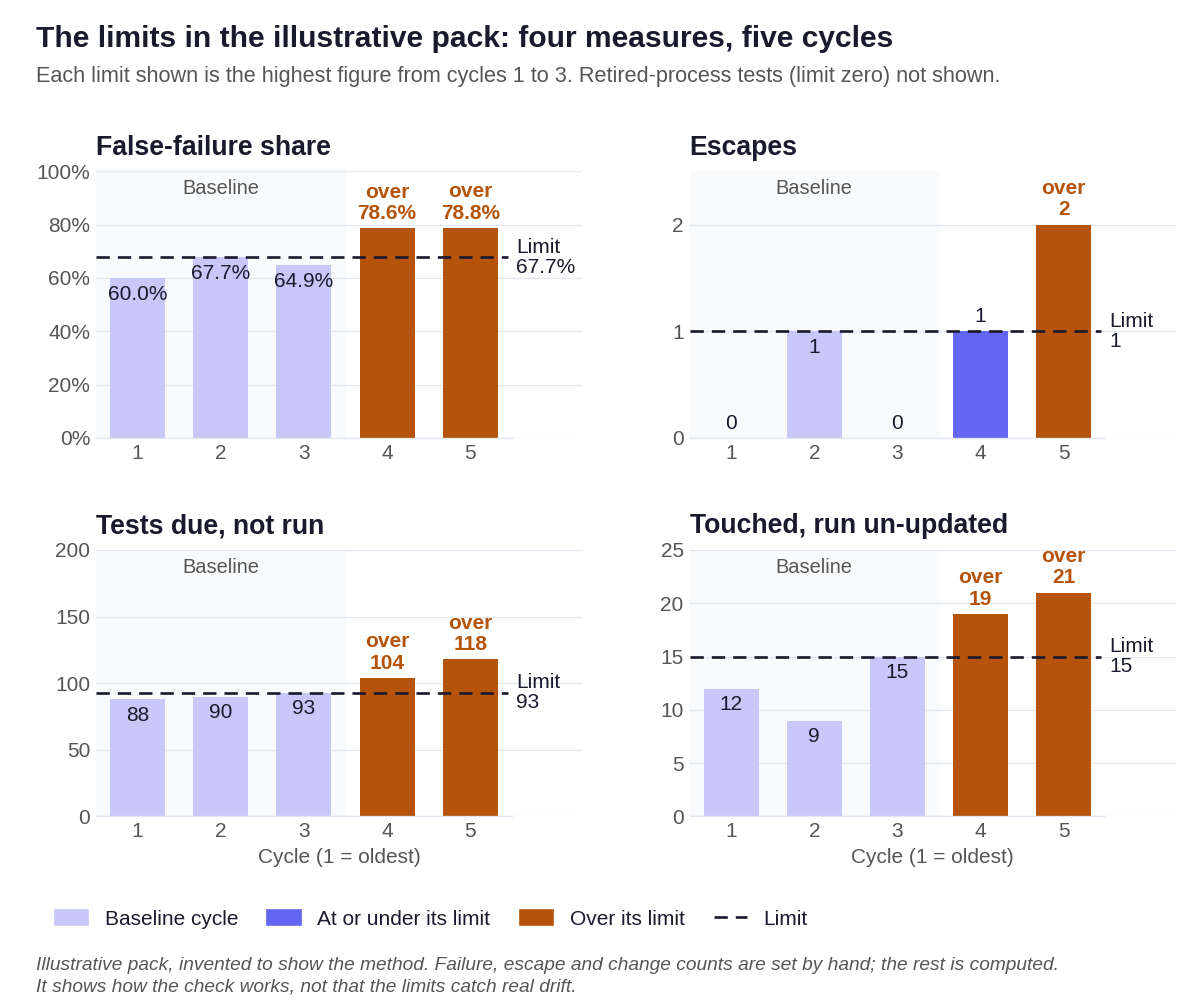
Either way, the review comes forward.
And any escape sends its process’s tests straight to clock 1, whatever the totals say. In the example pack, that happened to the order-to-cash tests in cycle 2. Then to the interface tests in cycle 4, and to the procure-to-pay and interface tests in cycle 5.
See how that works? The signals bring the whole review forward. Each escape gets its own process’s tests refreshed straight away.
What your limits miss: three blind spots
Limits taken from your own past have three blind spots.
First, they can’t catch drift that was already there. In the example pack, 60.0% to 67.7% of failures were already false in the three oldest cycles. So the limits were lenient.
Next, your last five cycles keep moving forward. So slow drift raises its own limits over time.
Finally, the share rises when real failures fall. In cycle 4, real failures dropped to 9. So read the share next to the raw count. That count was 33, then 41, against a baseline high of 24.
The calendar review is your backstop for all three.
Retire tests safely: keep, update, merge or archive
Review each test in a fixed order. Stop at the first rule that fits:
- On the never-retire list: keep it. Update it if it’s stale.
- Tests for a retired process: archive.
- Duplicates: merge.
- Stale tests: update. A test is stale if a change touched it and it’s still not updated, if it had two or more false failures in five cycles, or if it was skipped because its steps are out of date.
- Not run in five cycles, no defect on record, process unchanged: archive, after the process owner reads the archive list.
- Everything else: keep.
Start with the never-retire list
Some tests stay, whatever the counts say. The list covers payroll, tax and statutory reporting, roles and authorisations, and year-end and other period-end close tests. It also covers every test added after a production escape. If you run regulated processes, add their tests too.
In the example pack, 8 roles-and-authorisation tests met the archive rule. They stayed, because they’re on the list.
Yes, retiring tests feels risky. Nobody wants to retire the test that would have caught the next escape.
But look at what the list protects. Every test added after an escape stays put. And the order means nothing gets archived before the list has had its say.
Archive, never delete (and get the process owner to sign)
Archive, never delete. The test stays in your test tool, marked archived, with the reason and the date. Why? An archived test can come back. A deleted one can’t.
Cutting tests isn’t free, either, even when it’s done well.
In a 2024 peer-reviewed study, Rongqi Pan, Taher A. Ghaleb and Lionel C. Briand cut test suites to half their size with a similarity-based method. They ran it on 16 open-source Java projects, using unit tests.
The best-performing version still caught the fault in 84% of faulty versions on average. It also saved about 42% of testing time.
That can be a fair trade. But even this best version missed the fault in about one faulty version in six. It’s one study, of a different method, on a different kind of test. Still, the point carries: a cut has a cost.
So archive on evidence. Don’t delete on age.
Then hand the archive list to the owner of each process. They read it and sign it.
If you need a process owner’s or an auditor’s agreement before any test is archived, this list is the evidence you hand over. What an auditor requires before a regulated test is retired is a question for your auditor.
In my view, a fixed order and a signed list are what get a stalled clean-up past the first test nobody dares retire.
Here’s what the review gave the example pack:
| Outcome | Tests | What it covers |
|---|---|---|
| Keep | 1,003 | Includes 8 roles-and-authorisation tests kept because of the never-retire list |
| Update | 133 | Stale tests |
| Merge | 22 | Duplicates |
| Archive | 82 | 60 for the retired process, and 22 not run in five cycles with no defect on record |
| Total | 1,240 |
After the review, 1,102 tests are due in the next ordinary cycle. In cycle 5, 1,206 were due, and 118 of them didn’t run.
Archive on evidence, in order, with a signature. Never delete.
Your one-page regression pack health check
Here’s the whole rule on one page. Fill it in from your last five cycles, and hand the result to your release manager or process owner.
- Owner and last review: who owns the pack, and when it was last reviewed.
- Clock 1: before each cycle, update the tests each change touches. After an escape in a process, refresh that process’s tests straight away.
- Clock 2: your next full review date, from the calendar above. One of the year’s reviews falls after your financial year-end.
- Five measures: false-failure share; escapes; tests due, not run; touched, run un-updated; retired-process tests run. Keep signal 4 as a review column only.
- Limits: the highest figure in your three oldest cycles. Zero for retired-process tests.
- Trigger: two measures over in one cycle, or one over two cycles running. Then bring the review forward.
- Review order: never-retire list, retired process, duplicate, stale, not run with no defect, everything else.
- Inventory columns: test id, process area, manual or automated, year-end only, never-retire, process status, result in each of the last five cycles, outcome and why.
One page, filled in from your own results. That’s the whole method.
Never reviewed your pack? Start with one full review now
If your pack has never been reviewed, don’t wait for the trigger. Run one full review now, using the review order above. Then set your limits once you have five cycles of results.
So, how often should you refresh your regression pack?
Every change. Every platform update. And sooner when your own results say so.
Here’s what to do this week:
- Pull the results of your last five cycles.
- Set your limits from the three oldest.
- Put your next full review in the diary, before your next platform update reaches your test system.
If keeping scripts in step with each change is eating your test window, here’s how TurboCore approaches script maintenance and automation drift.
For the wider picture, see why ERP test automation fails, and how to fix it.